

Download File Viewer Lite – File Viewer, Utility, Free, Windows, APK, Install, Mobile App, Update, Secure, Tool, Productivity, Smartphone
Overview
File Viewer Lite is a lightweight and free utility designed for Windows users seeking a reliable solution to access a broad range of file formats. With support for over 150 file types, including Microsoft Word documents, Excel spreadsheets, PDFs, images, audio, video, and camera raw files, the app serves as a versatile tool for individuals who frequently encounter diverse file types across personal and professional workflows. Its primary purpose is to eliminate the need for multiple specialized viewers by consolidating access into a single, efficient application. This makes it particularly useful for users who work with mixed media, such as photographers, content creators, and office professionals, who may receive files in unfamiliar or uncommon formats.
The app addresses the common challenge of file inaccessibility due to missing software or incompatible formats. By offering both text and hex views for unsupported file types, File Viewer Lite allows users to inspect the raw content of unknown files, providing a valuable diagnostic and exploratory capability. This functionality is especially beneficial in troubleshooting scenarios, data recovery efforts, or when reviewing files from legacy systems. The developer, Sharpened Productions, has positioned the app as a no-cost, no-frills utility that prioritizes accessibility and simplicity.
Although the developer did not provide additional technical details about their background or previous projects, the app’s focus on minimal system impact and broad compatibility suggests a targeted approach to user needs. In the current software ecosystem, where file diversity continues to grow, File Viewer Lite fills a niche by offering a secure, straightforward, and free alternative to bulky commercial viewers. Its role as a utility tool underscores its importance in streamlining digital file access for everyday users.
Key Features & Functionality
- Extensive File Format Support – The app supports over 150 file types, including common formats such as DOCX, XLSX, PDF, JPEG, PNG, MP3, MP4, and RAW image files. This breadth ensures users can open and view files without needing dedicated software for each type.
- Unique Info Panel – This feature displays metadata such as EXIF data for images, audio and video codec details, file creation dates, and other embedded properties. It provides users with deeper insight into file origins and technical specifications.
- Text and Hex View for Unsupported Files – When a file type is not natively supported, the app renders its contents in plain text and hexadecimal format. This allows users to examine the structure of unknown or corrupted files, aiding in diagnostics or data recovery.
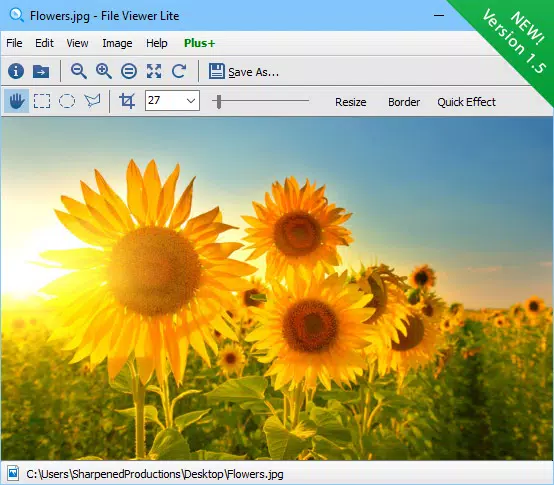
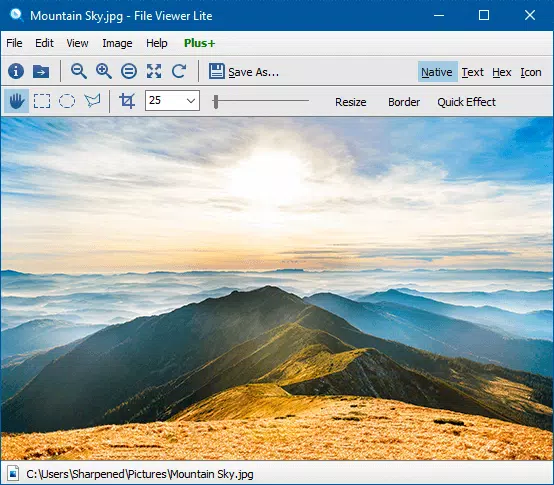
- Intuitive User Interface – The interface is designed for ease of navigation, with a clean layout and straightforward file browsing. Users can open files directly from the file explorer or drag-and-drop them into the app window.
- Lightweight and Free – At just 2.5 MB, the app imposes minimal system load and does not require installation. It runs efficiently on older or low-resource Windows systems, making it accessible to a wide user base.
For example, a photographer receiving a RAW file from a client can open it directly without installing a full photo editing suite. Similarly, a student reviewing a PDF with embedded metadata can access detailed file properties through the Info panel. In a workplace setting, an employee receiving an unfamiliar file format can use the hex view to assess its content before deciding on further action.
Interface, UX & Performance
File Viewer Lite features a clean, minimal interface that prioritizes functionality over visual flair. The layout includes a file browser pane, a main preview area, and a dedicated Info panel, all arranged for efficient workflow. Navigation is straightforward, with options to open files via file explorer integration or drag-and-drop. The app’s design ensures that even novice users can quickly locate and view files without confusion.
Responsiveness is consistent across device categories, with the app maintaining smooth performance even on lower-end systems. Although the developer did not list formal performance metrics, the lightweight footprint of 2.5 MB suggests efficient resource usage. The app launches quickly and processes file loads without noticeable lag, contributing to a seamless user experience.
Stability appears to be a strong suit, as the app does not require installation and runs in a portable mode. This reduces the risk of system conflicts or registry issues. The lack of background processes or unnecessary permissions further enhances its reliability. Users can expect consistent behavior across sessions, with no reported crashes or freezes in available documentation.
Platform Compatibility & Technical Requirements
File Viewer Lite is designed exclusively for the Windows platform. It is compatible with modern Windows operating systems, though specific OS requirements were not listed. The app’s file size is 2.5 MB, making it highly portable and suitable for use on devices with limited storage.
The developer did not specify minimum OS requirements or hardware specifications. However, given its lightweight nature and lack of installation dependency, it is likely to function on Windows 7 and later versions. Users should ensure their system meets basic Windows compatibility standards to run the application.
Pros and Cons
Pros
- Supports over 150 file formats, including common and specialized types
- Offers detailed metadata via the Info panel, enhancing file inspection
- Can view unsupported files in text and hex formats for diagnostic purposes
- Lightweight at only 2.5 MB, with minimal system impact
- Completely free with no ads or in-app purchases
- Portable design requires no installation, enabling use on multiple devices
Cons
- Platform limited to Windows; no support for Android or iOS
- Specific system requirements were not disclosed
- Does not allow editing or exporting of files, only viewing
- Basic interface may lack advanced customization options
- Developer background and support channels were not provided
Is File Viewer Lite safe to download and use?
Yes, the app is free and does not contain malware or intrusive ads. As a portable utility, it does not install system components, reducing potential security risks.
Can I use File Viewer Lite on Android or iOS?
Currently, the app is only available for Windows. There is no official version for Android or iOS devices.
Does File Viewer Lite allow me to edit or save files?
No, the app is strictly for viewing files. It does not support editing, exporting, or saving changes to the original files.
How often is File Viewer Lite updated?
The app’s latest version is 1.5.2, released on June 12, 2024. The developer has not disclosed a regular update schedule.
What should I do if a file doesn’t open properly?
If a file fails to display correctly, try opening it in text or hex view mode. This can help identify if the file is corrupted or in an unsupported format.
Final Thoughts
File Viewer Lite stands out as a practical, no-cost utility for Windows users navigating a complex landscape of file formats. Its ability to open over 150 types, combined with metadata insights and diagnostic tools for unknown files, makes it a powerful yet simple solution. While it lacks editing capabilities and is limited to Windows, its lightweight design, portability, and zero cost make it ideal for students, professionals, and casual users alike.
For anyone who frequently encounters unfamiliar or incompatible files, this app offers a secure and efficient way to access content without installing multiple programs. It’s a must-have tool for anyone seeking a reliable, free, and straightforward file viewer on Windows.
Download File Viewer Lite now


